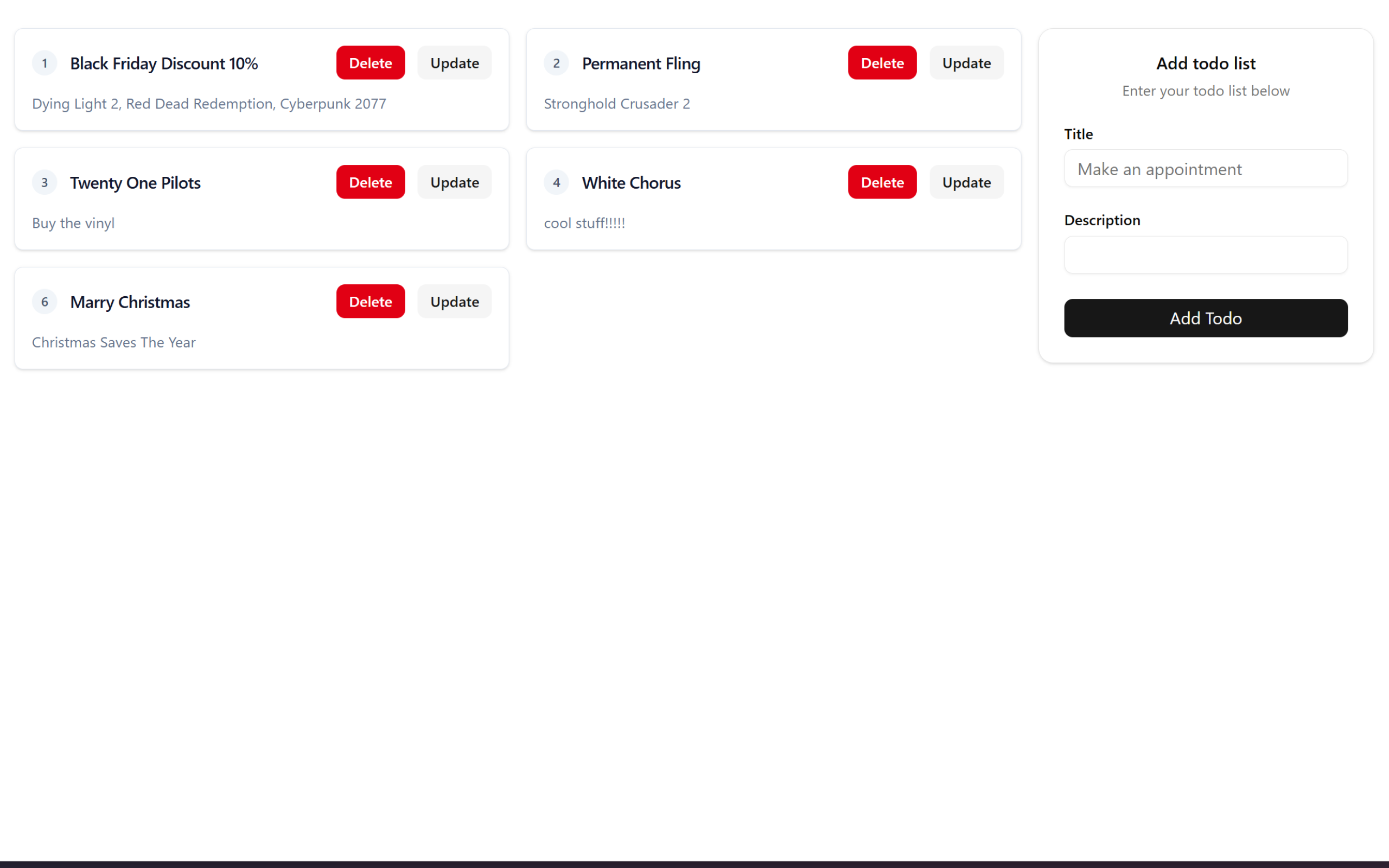
Vite + Gin + Gorm TODO List
My personal project transforming into a fullstack developer

Kumo
Vite + Gin + Gorm + MySQL TODO List
Introduction
As a person who enjoys frontend stuff like ui/ux and design engineering, backend stuff looks scary to me, but I'm gonna put an end to that fear today by creating a todo list using Vite for the frontend and GIN GORM for my backend, so now I can become a fullstack design engineer(jk still a long way to go lol) 🔥.
Initiate a New Project
For the new project structure, it'll look like this: separate the backend and frontend for more robust architecture.
gin-todo-app/
├── .gitignore               # Git ignore rules for both Go and Node
├── README.md                # Project documentation
├── backend/                 # 🐘 Golang Backend (API)
└── frontend/                # ⚛️ React Frontend (Vite)
Backend
Aight so for the backend i'll be using GIN (Web Framework), GORM (ORM Library for working with databases), MySQL (Database) for simplicity.
├── backend/                 # 🐘 Golang Backend (API)
│   ├── config/
│   │   └── database.go      # Database connection & GORM setup
│   ├── controllers/
│   │   └── todo.go          # HTTP Handlers (Business Logic)
│   ├── models/
│   │   └── model.go         # Database Structs & Schema definitions
│   │   └── todos.go         # Query operations occure
│   ├── routes/
│   │   └── routes.go        # Router setup & CORS Middleware configuration
│   ├── go.mod               # Go Module definition
│   ├── go.sum               # Go dependencies checksums
│   └── main.go              # Entry point (Server initialization)
Config
Config only contain 1 file and it's the database.go.
package config

import(
	"fmt"
	"github.com/jinzhu/gorm"
)

type DBConfig struct {
	Host string
	Port int
	User string
	DBName string
	Password string
}

// Singleton db connection to be accessible to all file
var DB *gorm.DB

func BuildDBConfig() *DBConfig {
	dbConfig := DBConfig{
		Host: "0.0.0.0",
		Port: 3306,
		User: "root",
		DBName: "todos",
		Password: "mypassword",
	}
	return &dbConfig
}

func DbUrl(dbConfig *DBConfig) string {

	return fmt.Sprintf(
		"%s:%s@tcp(%s:%d)/%s?charset=utf8&parseTime=True&loc=Local",
		dbConfig.User,
		dbConfig.Password,
		dbConfig.Host,
		dbConfig.Port,
		dbConfig.DBName,
	)
}
First the database struct type needs to be specified, port use int while the
rest value are string.
type DBConfig struct {
	Host string
	Port int
	User string
	DBName string
	Password string
}
Implement a singleton pattern for var DB using a pointer to gorm.db. It is
useful if other files, such as the queries in models/todos.go need to access
the database.
var DB *gorm.DB
Set your own database config based on your local environment. These two
functions are important for DB Connection in main.go
func BuildDBConfig() *DBConfig {
	dbConfig := DBConfig{
		Host: "0.0.0.0",
		Port: 3306,
		User: "root",
		DBName: "todos",
		Password: "mypassword",
	}
	return &dbConfig
}

func DbUrl(dbConfig *DBConfig) string {

	return fmt.Sprintf(
		"%s:%s@tcp(%s:%d)/%s?charset=utf8&parseTime=True&loc=Local",
		dbConfig.User,
		dbConfig.Password,
		dbConfig.Host,
		dbConfig.Port,
		dbConfig.DBName,
	)
}
Models
The models directory contains model.go and todos.go. model.go is where
the database structs & schema definitions, for a larger project there would be
a lot of schema but for the sake of simplicity in todo app, there's only one.
todos.go is where the queries happen using GORM from the
config/database.go. I'll explain the detail below. First there is
model.go, it contains a struct and a method. The struct contains the table
schema with JSON tags for the frontend and a method that follows the GORM
conventions for naming (in this case it's TableName() to change the table
name from GORM default). When the Todo struct is instantiated using
&models.Todo{} for migrate, the method TableName() is also executed to
name the table.
package models

type Todo struct {
	ID uint `json:"id"`
	Title string `json:"title"`
	Description string `json:"description"`
}

func (t *Todo) TableName() string {
	return "todo"
}
Next there is todos.go, it contains all the queries for our todo app. It
uses the config import to get the config.DB, so it enables us to use the
GORM query. Meanwhile for _ "github.com/go-sql-driver/mysql" it acts only as
initialization of MySQL driver via side effects, so our app can communicate
with the MySQL database (we don't need to call any func from the import).
package models

import (
	"fmt"
	"gin-todo-app/config"

	_ "github.com/go-sql-driver/mysql"
)

// fetch all todos

func GetAllTodos(todo *[]Todo) (err error){
	err = config.DB.Find(todo).Error;

	if err != nil {
		return err
	}

	return nil
}

func CreateATodo(todo *Todo) (err error){
	err = config.DB.Create(todo).Error;
	if err != nil {
		return err
	}
	return nil
}

func GetATodo(todo *Todo, id string) (err error){
	err = config.DB.Where("id = ?", id).First(todo).Error;
	if err != nil {
		return err
	}
	return nil
}

func UpdateATodo(todo *Todo, id string) (err error){
	fmt.Println(todo)
	config.DB.Save(todo)
	return nil
}

func DeleteATodo(todo *Todo, id string) (err error){
	config.DB.Where("id = ?", id).Delete(todo)
	fmt.Printf("Deleted %s", id)
	return nil
}
These two functions look similiar,GetAllTodos get all list of todo (todo *[]Todo) in the database, while CreateATodo makes a new todo (todo *Todo) into the db. This may look confusing but in err = the query does happen and fill it to the pointer todo, the err value only takes the error message during the query and return the err.
func GetAllTodos(todo *[]Todo) (err error){
	err = config.DB.Find(todo).Error;

    if err != nil {
    	return err
    }

    return nil

}

func CreateATodo(todo \*Todo) (err error){
err = config.DB.Create(todo).Error;
if err != nil {
return err
}
return nil
}
Now these 3 functions look different because they have an id parameter that targets a specific todo id. GetATodo & DeleteATodo use Where query, while UpdateATodo directly saves the updated todo entry.
func GetATodo(todo *Todo, id string) (err error){
	err = config.DB.Where("id = ?", id).First(todo).Error;
	if err != nil {
		return err
	}
	return nil
}

func UpdateATodo(todo *Todo, id string) (err error){
	fmt.Println(todo)
	config.DB.Save(todo)
	return nil
}

func DeleteATodo(todo *Todo, id string) (err error){
	config.DB.Where("id = ?", id).Delete(todo)
	fmt.Printf("Deleted %s", id)
	return nil
}
Controllers
The Controllers directory contains todo.go that works as HTTP Handlers by
using the models/todos.go queries. The pattern looks similiar to
models/todos.go but controllers use gin context to handle http requests,
I'll explain more down below.
package controllers

import (
	"gin-todo-app/models"
	"net/http"

    "github.com/gin-gonic/gin"

)

// So here we're passing the empty todo using pointer to be updated by the model method
func GetAllTodos(c *gin.Context){
var todo []models.Todo;

    err := models.GetAllTodos(&todo);

    if err != nil {
    	c.AbortWithStatus(http.StatusNotFound)
    }
    c.JSON(http.StatusOK,todo)

}

func CreateATodo(c *gin.Context){
var todo models.Todo;

c.BindJSON(&todo)
err:= models.CreateATodo(&todo);

    if err != nil{
    	c.AbortWithStatus(http.StatusNotFound)
    }
    c.JSON(http.StatusOK, todo)

}

func GetATodo(c *gin.Context){
id := c.Params.ByName("id");
var todo models.Todo;

    err:= models.GetATodo(&todo, id)

    if err != nil{
    	c.AbortWithStatus(http.StatusNotFound)
    }
    c.JSON(http.StatusOK, todo)

}

func UpdateATodo(c *gin.Context){
id := c.Params.ByName("id");
var todo models.Todo;

    err:=models.GetATodo(&todo,id)

    if err != nil {
    	c.AbortWithStatus(http.StatusNotFound)
    }

    c.BindJSON(&todo)
    err=models.UpdateATodo(&todo,id)
    if err != nil {
    	c.AbortWithStatus(http.StatusNotFound)
    }
    c.JSON(http.StatusOK, todo)

}

func DeleteATodo(c *gin.Context){
id := c.Params.ByName("id");
var todo models.Todo;

    err:=models.GetATodo(&todo,id)

    if err != nil {
    	c.AbortWithStatus(http.StatusNotFound);
    }

    err = models.DeleteATodo(&todo, id)

    if err != nil{
    	c.AbortWithStatus(http.StatusNotFound)
    }
    c.JSON(http.StatusOK,todo)

}
So remember when i said, it looks similiar with the queries in models/todos.go? The only different is that the use context from *gin.Context.
// If the error occures from the query, use AbortWithStatus
c.AbortWithStatus(http.StatusNotFound)

// BindJSON to create or update into the database
c.BindJSON(&todo)

// use context to get the id from the params
id := c.Params.ByName("id");

// send 200 response with todo data in json format
c.JSON(http.StatusOK,todo)
Routes
The routes directory contains routes.go and the route uses the Gin
framework. It also only has one func called SetupRouter() that configures
and returns the *gin.Engine.
package routes

import (
	"gin-todo-app/controllers"
	"time"

    "github.com/gin-contrib/cors" // 1. Import ini
    "github.com/gin-gonic/gin"

)

func SetupRouter() \*gin.Engine {
// r -> router
r := gin.Default()

    // CORS is solved saat berada di modul route, karena menetapkan aturannya terlebih dahulu sebelum jalan
    r.Use(cors.New(
    	cors.Config{
    		AllowOrigins: []string{"http://localhost:5173"},
    		AllowMethods: []string{"GET","POST","PUT","PATCH","DELETE","HEAD"},
    		AllowHeaders: []string{"Origin","Content-Type","Authorization"},
    		ExposeHeaders: []string{"Content-Length"},
    		AllowCredentials: true,
    		MaxAge: 12*time.Hour,
    	}))


    // Versioning route with version 1st variable
    v1 := r.Group("v1/")
    {
    	v1.GET("todo", controllers.GetAllTodos)
    	v1.POST("todo", controllers.CreateATodo)
    	v1.GET("todo/:id", controllers.GetATodo)
    	v1.PUT("todo/:id", controllers.UpdateATodo)
    	v1.DELETE("todo/:id", controllers.DeleteATodo)
    }
    return r

}
First we set up the route by using the gin default (it includes middleware, but for other configurations, refer to the official Gin docs).
r := gin.Default()
And then set the cors.Config to allow the frontend (one origin) to request resources from the backend (a different origin). Set the config as follows, or adjust it depending on your environment settings.
	r.Use(cors.New(
		cors.Config{
			AllowOrigins: []string{"http://localhost:5173"},
			AllowMethods: []string{"GET","POST","PUT","PATCH","DELETE","HEAD"},
			AllowHeaders: []string{"Origin","Content-Type","Authorization"},
			ExposeHeaders: []string{"Content-Length"},
			AllowCredentials: true,
			MaxAge: 12*time.Hour,
		}))
Create a versioning group (example here v1) and v1 contains http method such as GET,POST,PUT,DELETE that will be paired with the end point, any required IDs, and controller's http handlers.
v1 := r.Group("v1/")
	{
		v1.GET("todo", controllers.GetAllTodos)
		v1.POST("todo", controllers.CreateATodo)
		v1.GET("todo/:id", controllers.GetATodo)
		v1.PUT("todo/:id", controllers.UpdateATodo)
		v1.DELETE("todo/:id", controllers.DeleteATodo)
	}
Main
Now that everything is in its place, main.go connects all of them (config, models, routes). Use GORM to create a db connection using our config from
database.go, then run the migration from models/model.go. Finally setup
the route from routes.go and run it on any port(in this case, 3000).
package main

import (
	"fmt"
	"gin-todo-app/config"
	"gin-todo-app/models"
	"gin-todo-app/routes"
	"github.com/jinzhu/gorm"
)

var err error;

func main() {
// Create a DB Connection
config.DB,err = gorm.Open("mysql", config.DbUrl(config.BuildDBConfig()))

    if err != nil {
    	fmt.Println("Status:", err)
    }

    // this line means all of main functionality needs to be finish first before the db is close
    defer config.DB.Close()

    // Run migrations
    config.DB.AutoMigrate(&models.Todo{})

    // setup routes;

    r := routes.SetupRouter()

    // running
    r.Run(":3000")

}
Now that our backend is up, let's move on to the frontend.
Frontend
The frontend uses Vite with ShadCN and TailwindCSS, it is structured like this:
src/
├── assets/
├── components/
│   ├── custom/
│   │   ├── CardForm.tsx
│   │   ├── CardList.tsx
│   │   ├── DeleteModalTodo.tsx
│   │   └── EditModalTodo.tsx
│   └── ui/
│       ├── button.tsx
│       ├── card.tsx
│       ├── input.tsx
│       └── label.tsx
├── lib/
├── App.css
├── App.tsx
├── index.css
└── main.tsx
Custom components use dependencies from ShadCN in components/ui/*. Install
the needed ui components from ShadCN first and thencreate your custom
components in components/custom/*.
App
The application is pretty simple, it only has App.tsx, which renders
CardForm.tsx & CardList.tsx next to each other
import CardList from "./components/custom/CardList";
import "./App.css";
import CardForm from "./components/custom/CardForm";

function App() {
return (
<div className="flex gap-4 ">
<CardList />
<CardForm />
</div>
);
}

export default App;
Card Form
The CardForm contains the todo list title & description. It lets the user fill out the form and then submits it to the backend using POST method.
import { Input } from "../ui/input";
import { Label } from "../ui/label";
import { Button } from "../ui/button";
import {
  Card,
  CardContent,
  CardDescription,
  CardFooter,
  CardHeader,
  CardTitle,
} from "../ui/card";
import React, { useState } from "react";

interface Form {
title: string;
description: string;
}

export default function CardForm() {
  const [form, setForm] = useState<Form>({ title: "", description: "" });
  const [isLoading, setIsLoading] = useState(false);

const handleChange = (e: React.ChangeEvent<HTMLInputElement>) => {
const { name, value } = e.target;

    setForm((prev) => ({
      ...prev,
      [name]: value,
    }));

};

const handleSubmit = async (e: React.FormEvent) => {
e.preventDefault();

    if (!form.title && !form.description)
      return alert("There are empty fields!");

    setIsLoading(true);

    try {
      const response = await fetch("http://localhost:3000/v1/todo", {
        method: "POST",
        headers: {
          "Content-Type": "application/jsom",
        },
        body: JSON.stringify(form),
      });

      if (!response.ok) {
        throw new Error("Failed to create todo");
      }

      // const newTodo = await response.json();

      setForm({ title: "", description: "" });
    } catch (error) {
      console.error("Error submitting form: ", error);
      alert("something went wrong");
    } finally {
      setIsLoading(false);
      window.location.reload();
    }

};

return (
<>
<div className="w-1/4  ">
<Card className="w-full">
<CardHeader>
<CardTitle>Add todo list</CardTitle>
<CardDescription>Enter your todo list below</CardDescription>
</CardHeader>
<CardContent>
<form>
<div className="flex flex-col gap-6">
<div className="grid gap-2">
<Label htmlFor="title">Title</Label>
<Input
                    id="title"
                    type="text"
                    placeholder="Make an appointment"
                    name="title"
                    value={form.title}
                    onChange={handleChange}
                    disabled={isLoading}
                    required
                  />
</div>
<div className="grid gap-2">
<div className="flex items-center">
<Label htmlFor="description">Description</Label>
</div>
<Input
                    id="description"
                    type="text"
                    name="description"
                    value={form.description}
                    onChange={handleChange}
                    disabled={isLoading}
                    required
                  />
</div>
</div>
</form>
</CardContent>
<CardFooter className="flex-col gap-2">
<Button
              type="submit"
              className="w-full"
              disabled={isLoading}
              onClick={handleSubmit}
            >
{isLoading ? "Loading" : "Add Todo"}
</Button>
</CardFooter>
</Card>
</div>
</>
);
}
Card List
Next is CardList, it contains all the todo items by fetching the list using the GET method and then mapping it to the card components. Each card also has an EditTodoModal to update the card and a DeleteTodoModal to delete the card, they work by passing the fetched data into the respective component, more of them will be explained below.
import { useState, useEffect } from "react";
import { Button } from "../ui/button";

import EditTodoModal from "./EditModalTodo";
import DeleteTodoModal from "./DeleteModalTodo";

interface Todo {
  id: number;
  title: string;
  description: string;
}

export default function CardList() {
  const [todos, setTodos] = useState<Todo[]>([]);
  const [editingTodo, setEditingTodo] = useState<Todo | null>(null);
  const [deletingTodo, setDeletingTodo] = useState<Todo | null>(null);

  useEffect(() => {
    fetch("http://localhost:3000/v1/todo")
      .then((res) => res.json())
      .then((data) => {
        setTodos(data);
      })
      .catch((err) => console.log("Failed to fetch data:", err));
  }, []);

  return (
    <>
      <div className="w-3/4 ">
        {/* <span>This is Card List</span> */}
        <ul className="grid grid-cols-2 gap-4">
          {todos &&
            todos.map((item) => (
              <li
                key={item.id}
                className="group flex flex-col gap-3 rounded-md border border-slate-200 bg-white p-4
                shadow-sm transition-all hover:shadow-md"
              >
                <div className="flex items-center justify-between">
                  <div className="flex items-center gap-3">
                    {/* ID Badge - Style ala 'Badge' shadcn */}
                    <span className="flex h-6 w-6 items-center justify-center rounded-full
                    bg-slate-100 text-xs font-medium text-slate-600">
                      {item.id}
                    </span>
                    {/* Title - Typography tebal dan rapi */}
                    <h3 className="font-semibold leading-none  text-slate-900">
                      {item.title}
                    </h3>
                  </div>
                  <div className="flex items-center gap-3">
                    <Button
                      variant={"destructive"}
                      size={`sm`}
                      onClick={() => setDeletingTodo(item)}
                    >
                      <span className="text-sm font-semibold">Delete</span>
                    </Button>
                    <Button
                      variant={"secondary"}
                      size={`sm`}
                      onClick={() => setEditingTodo(item)}
                    >
                      <span className="text-sm font-semibold">Update</span>
                    </Button>
                  </div>
                </div>

                {/* Description - Warna text-muted-foreground (abu-abu) */}
                <p className="text-sm text-slate-500 text-start">
                  {item.description}
                </p>
              </li>
            ))}
        </ul>
      </div>
      {editingTodo && (
        <EditTodoModal
          todo={editingTodo}
          onClose={() => setEditingTodo(null)}
        />
      )}

      {deletingTodo && (
        <DeleteTodoModal
          todo={deletingTodo}
          onClose={() => setDeletingTodo(null)}
        />
      )}
    </>
  );
}
Edit Modal
EditTodoModal is on the card as an update button, when the fetched data is
passed to the component, the data can be updated using the PUTmethod using
the specific data ID. After the response is sent, the window is reloaded to
update the todo list in the UI.
import React, { useState, useEffect } from "react";

import {
  Card,
  CardContent,
  CardDescription,
  CardFooter,
  CardHeader,
  CardTitle,
} from "../ui/card";
import { Input } from "../ui/input";
import { Label } from "../ui/label";
import { Button } from "../ui/button";

interface Todo {
id: number;
title: string;
description: string;
}

interface EditModalProps {
todo: Todo;
onClose: () => void;
}

export default function EditTodoModal({ todo, onClose }: EditModalProps) {
  const [formData, setFormData] = useState({
    title: "",
    description: "",
  });

const [isLoading, setIsLoading] = useState(false);

// Prefill data saat modal muncul

useEffect(() => {
setFormData({ title: todo.title, description: todo.description });
}, [todo]);

const handleChange = (e: React.ChangeEvent<HTMLInputElement>) => {
const { name, value } = e.target;
setFormData((prev) => ({ ...prev, [name]: value }));
};

const handleSubmit = async (e: React.FormEvent) => {
e.preventDefault();
setIsLoading(true);

    console.log(formData)

    try {
      const response = await fetch(
        `http://localhost:3000/v1/todo/${todo.id}`,
        {
          method: "PUT",
          headers: { "Content-Type": "application/json" },
          body: JSON.stringify(formData),
        }
      );

      if (response.ok) {
        window.location.reload();
      } else {
        alert("Failed to update todo");
        setIsLoading(false);
      }
    } catch (error) {
      console.error("Error updating:", error);
      setIsLoading(false);
    }

};

return (
// 1. Overlay Hitam (Background Modal)
<div className="fixed inset-0 z-50 flex items-center justify-center
 bg-black/50 backdrop-blur-sm p-4">
{/* 2. Card Component (Gaya Shadcn seperti request Anda) */}
<Card className="w-full max-w-md">
<CardHeader>
<CardTitle>Edit Todo</CardTitle>
<CardDescription>Make changes to your task here.</CardDescription>
</CardHeader>

        <CardContent>
          <form onSubmit={handleSubmit}>
            <div className="flex flex-col gap-6">
              {/* Title Input */}
              <div className="grid gap-2">
                <Label htmlFor="edit-title">Title</Label>
                <Input
                  id="edit-title"
                  type="text"
                  name="title"
                  placeholder="Todo Title"
                  value={formData.title}
                  onChange={handleChange}
                  disabled={isLoading}
                  required
                />
              </div>

              {/* Description Input */}
              <div className="grid gap-2">
                <div className="flex items-center">
                  <Label htmlFor="edit-description">Description</Label>
                </div>
                <Input
                  id="edit-description"
                  type="text"
                  name="description"
                  placeholder="Details..."
                  value={formData.description}
                  onChange={handleChange}
                  disabled={isLoading}
                  required
                />
              </div>
            </div>
          </form>
        </CardContent>

        <CardFooter className="flex justify-between flex-col gap-2">
          {/* Tombol Save */}
          <Button
            type="submit"
            className="w-full"
            disabled={isLoading}
            onClick={handleSubmit} // Trigger submit manual
          >
            {isLoading ? "Saving..." : "Save Changes"}
          </Button>

          {/* Tombol Cancel */}
          <Button variant="outline" className="w-full" onClick={onClose}>
            Cancel
          </Button>
        </CardFooter>
      </Card>
    </div>

);
}
Delete Modal
So it looks the same as the edit modal, but this one is pretty sraightforward. After receiving data from the card, the modal here works as a confirmation. It uses specific ID in the response and then uses the DELETE method to remove the data and then reloads the window to update the UI.
import React, { useState, useEffect } from "react";

import {
  Card,
  CardContent,
  CardDescription,
  CardFooter,
  CardHeader,
  CardTitle,
} from "../ui/card";

import { Button } from "../ui/button";

interface Todo {
  id: number;
  title: string;
  description: string;
}

interface DeleteModalProps {
  todo: Todo;
  onClose: () => void;
}

export default function DeleteTodoModal({ todo, onClose }: DeleteModalProps) {
  const [formData, setFormData] = useState({
    title: "",
    description: "",
  });

  const [isLoading, setIsLoading] = useState(false);

  // Prefill data saat modal muncul

  useEffect(() => {
    setFormData({ title: todo.title, description: todo.description });
  }, [todo]);

  const handleSubmit = async (e: React.FormEvent) => {
    e.preventDefault();
    setIsLoading(true);

    console.log(formData);

    try {
      const response = await fetch(`http://localhost:3000/v1/todo/${todo.id}`, {
        method: "DELETE",
        headers: { "Content-Type": "application/json" },
        body: JSON.stringify(formData),
      });

      if (response.ok) {
        window.location.reload();
      } else {
        alert("Failed to delete todo");
        setIsLoading(false);
      }
    } catch (error) {
      console.error("Error updating:", error);
      setIsLoading(false);
    }
  };

  return (
    <div className="fixed inset-0 z-50 flex items-center justify-center
    bg-black/50 backdrop-blur-sm p-4">
      <Card className="w-full max-w-md">
        <CardHeader>
          <CardTitle>Delete Todo</CardTitle>
          <CardDescription>Remove your todo.</CardDescription>
        </CardHeader>

        <CardContent>
          <span>
            Are you sure you want to delete the todo list (your action cannot be
            undo)
          </span>
        </CardContent>

        <CardFooter className="flex justify-between flex-col gap-2">
          {/* Tombol Delete */}
          <Button
            type="submit"
            className="w-full"
            disabled={isLoading}
            onClick={handleSubmit} // Trigger submit manual
            variant={"destructive"}
          >
            {isLoading ? "Deleting..." : "Delete"}
          </Button>

          {/* Tombol Cancel */}
          <Button variant="outline" className="w-full" onClick={onClose}>
            Cancel
          </Button>
        </CardFooter>
      </Card>
    </div>
  );
}
Closing
So, that was my experience making a full-stack todo list app. I found it challenging to understand Go for the backend because I mainly use TypeScript, but it was worth the effort! And now I'm ready to be a Junior Full-Stack Developer (the journey continues).